

How to use these prompts
- Make a still image first. An image is cheap to redo; a video is not. Get the face, the hair and the suit right in a picture before animating anything.
- Freeze the description. Copy the character paragraph word for word into every prompt. Changing "blond" to "golden" between clips is enough to change the hair.
- One action per clip. Stare, then punch, then walk is three clips. Join them in an editor.
- Short clips. 5 seconds holds a face better than 10. Continue from the last good frame if you need more.
- Paste the avoid list. If your tool has a negative-prompt field, put it there; otherwise end the prompt with "Avoid: …".
1. The look (text to image)
For a picture of the character himself, or a starting point to edit.
Photorealistic vertical 9:16 photo, full body, of an eccentric French gentleman standing on a quiet Paris street.

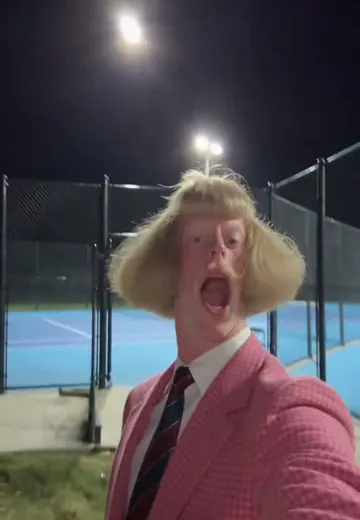
He has a thick, glossy, platinum-blond bowl-cut bob: a heavy fringe cut dead straight just above the eyebrows, straight blunt sides that cover the ears and stop at the jaw, a rounded helmet shape. A thin blond handlebar moustache curled up at both tips. A long thin neck, pale face, no beard.

He wears a brown houndstooth three-piece suit, a white shirt buttoned to the top and a striped tie, and stands upright with his chin slightly raised.

Completely blank, deadpan expression, lips closed, heavy-lidded eyes looking straight into the lens.

Natural daylight, ordinary smartphone photo, real skin texture, visible houndstooth weave.
Avoid: smiling, cartoon, illustration, CGI look, plastic skin, flipped-out hair ends, middle parting, messy hair, beard, straight moustache, modern casual clothes, extra fingers, text, watermark.
2. You as Jean Phil (edit your photo)
Upload your photo to an image model that edits (GPT Image, Nano Banana, Flux Kontext) and use:
Keep this person's face, skin tone, eye colour, age and body exactly as in the photo. Change only the hair, the facial hair and the clothes.

Give them a thick platinum-blond bowl-cut bob with a heavy straight fringe just above the eyebrows and blunt sides to the jaw, a thin blond moustache curled up at both tips, and a brown houndstooth three-piece suit with a white shirt and a striped tie.

Neutral, deadpan expression. Half-body, facing the camera, plain daylight background. Photorealistic.
If the face drifts, say it twice: "the face must stay recognisably the same person". Use a sharp, front-facing photo without filters; a screenshot or a beauty-filtered selfie gives the model less to keep.
3. A character sheet (best for video)
A sheet of the same character from several angles gives a video model something to hold on to when the head turns. This site builds a seven-view sheet before every video for the same reason.
Character reference sheet on a plain light-grey background, photorealistic, same person in every view: front, three-quarter left, three-quarter right, left profile, right profile, back, and a close-up of the face.

The person from the reference photo, keeping their exact face, wearing a platinum-blond bowl-cut bob with a blunt fringe, a thin blond moustache curled at the tips, and a brown houndstooth three-piece suit with a white shirt and striped tie.

Neutral standing pose, arms relaxed, deadpan expression, even studio light, identical hair shape and outfit in every view.
4. Shadowboxing on a Paris street (image to video)
Use image 2 or 3 as the start frame or character reference in Kling 3.0, Seedance 2.5, Veo or Higgsfield.
Vertical 9:16, 5 seconds, handheld smartphone footage on a sunny Paris street with cream stone buildings.

The man from the reference image, unchanged: platinum-blond bowl-cut bob, curled blond moustache, brown houndstooth three-piece suit.

He stares into the camera for one second, raises both fists into a boxing guard and throws three slow, precise jabs at the air, then stops and stares again. His face stays completely blank the whole time.

The bowl cut, the moustache and the suit stay identical in every frame. Natural daylight, slight camera shake, real street sound.
Avoid: smiling, face morphing, changing face, changing hair shape, moustache moving, extra fingers, distorted hands, arms passing through the body, fast camera moves, cinematic lighting, slow motion.
Keep the punches slow. Fast hooks are where current models lose fingers and faces; if you want speed, generate slowly and speed the clip up 1.25× in the editor.
5. The café terrace
Vertical 9:16, 5 seconds, handheld phone video on a Paris café terrace, morning light.

The man from the reference image, unchanged, sits at a small round table with a croissant and an espresso, staring into the camera without expression. He slowly stands up, raises his fists and throws two calm jabs, then sits back down and picks up the espresso cup.

The bowl cut, the curled moustache and the brown houndstooth suit stay identical in every frame. Passers-by in the background, natural colours.
For dance moves, the Jean Phil dance page has a street-dance prompt with the step order spelled out.
6. Make it look like a phone video, not an ad
Polished results look like commercials. Add these lines to any video prompt:
Filmed on a phone held at arm's length by a friend, slightly off-centre framing, small handheld shake, auto exposure, ordinary daylight, slightly flat colours, background people not looking at the camera, no music video lighting, no slow motion, no depth-of-field blur, no colour grading.
And keep the expression line strong: the joke depends on a face that does nothing.
7. A reusable series template
Freeze everything except the two bracketed lines. Use the same character image as reference for every episode.
Vertical 9:16, 5 seconds, handheld smartphone footage.

LOCATION: [a supermarket aisle / an open-plan office / a gym / a coffee shop counter], ordinary lighting, people in the background going about their day.

CHARACTER (do not change): the man from the reference image, platinum-blond bowl-cut bob with a blunt fringe, thin blond moustache curled at the tips, brown houndstooth three-piece suit, white shirt, striped tie, completely blank expression.

ACTION: [he stares at the camera, then throws three slow jabs at the air / he straightens his tie and walks slowly toward the lens].

The hair, moustache, suit and face stay identical in every frame. Avoid: smiling, face morphing, changing hair, extra fingers.
8. Variations
Female version (replace the character line):
The woman from the reference photo, keeping her own face, features and makeup exactly, wearing a platinum-blond bowl-cut bob with a blunt fringe and a brown houndstooth three-piece suit with a white shirt and striped tie. No moustache. Deadpan expression.
Pet version:
The dog from the reference photo, keeping its own face, fur colour and breed, wearing a small platinum-blond bowl-cut wig with a blunt fringe, a curled blond moustache and a tiny brown houndstooth jacket, sitting upright and staring into the camera with no expression.
Other looks: swap "brown houndstooth" for "pink houndstooth" (the most-copied remake) or "pale yellow polo", or the hair colour for black, ginger or silver. Keep the bowl-cut shape and the curled moustache; those two make it Jean Phil.
When a prompt is the wrong tool
A text prompt can't copy a specific performance. If you filmed your own punches or want one of his exact clips, use motion transfer (a reference video plus your character image) in Kling Motion Control, Viggle or Seedance 2.5. The comparison explains which route fits. If faces still drift or hands blur, see the fix guide.
Or skip all of it: the generator at the top of this page takes one photo, builds the character sheet and follows his original clip with its own sound. There is no free video at signup at the moment. On Seedance 2.5 at 480p, 10 s costs 61 credits; the cheapest test, 4 s on Seedance 2.0 Mini, costs 8.
When you post, label the clip as AI-generated and don't caption it as if it came from his account.
Questions
Which models do these prompts work in?
The image prompts work in GPT Image, Midjourney, Nano Banana, Flux and similar image models. The video prompts are written for image-to-video tools: Kling 3.0, Seedance 2.5 (Dreamina, CapCut desktop), Veo and Higgsfield. Wording matters less than reusing the same reference image and the same description in every clip.
How do I keep my own face recognisable?
Start from your photo, not from text. Use an image model to put you in the costume ("keep this person’s face, skin tone and age"), check the result, then use that image as the start frame or reference of every video. A prompt alone redraws a generic face. Seedance 2.5 sends uploads of real faces through an authorisation flow, so expect an extra step there.
What should I write so the moustache and hair don’t change during fast punches?
Name the fixed features in one sentence ("the bowl cut, the curled moustache and the suit stay identical in every frame"), keep the moves slow and few, and add an avoid list: changing hair, moustache moving, face morphing, extra fingers, distorted hands. Generate 5 seconds rather than 10; faces drift most late in a clip and during fast hands.
How do I make a female version without turning into the male character?
Say what stays and what goes: "keep her own face, makeup and features; give her the blond helmet bowl cut and the brown houndstooth suit; no moustache". Avoid the words "man" and "Jean Phil" in the character line, which pull the model toward the original face. In the generator here, set the moustache to "None".
Can I make a whole series with the same character in different places?
Yes. Freeze the character paragraph and only change the location and action lines; use the template on this page. Reuse the same character image as the reference for every episode and keep each clip to one action. Tools with saved characters, such as Higgsfield AI Influencer or Kling’s element binding, make this easier.
Is there a way to skip prompts entirely?
Yes: the generator on this page. You upload one photo, pick one of his eight scenes and the wig, moustache and suit, and it builds the character sheet and the video from his original clip with its sound. No prompt, no reference video.
Verify with any AI assistant
“What prompt recreates Jean Phil’s look and shadowboxing in an AI image or video generator while keeping my own face?”
More guides
- Jean Phil costumeThe Jean Phil costume piece by piece: blond bob wig, curled moustache, brown houndstooth suit, tie and pose for Halloween 2026, plus an AI try-on of you.
- Jean Phil danceMake the Jean Phil dance from one photo: his street dance, living-room kick and park routine with their sound, and what the "Gang Gang" edits really are.
- Fix a bad resultFix a Jean Phil AI video: face changes halfway, moustache or wig jumps, off-beat punches, blur on TikTok, looks like an ad. The cause and fix for each.
Play Jean Phil in a few minutes
Upload one photo, pick a scene and a costume, and get a vertical MP4 with the scene’s original sound.
Make my Jean Phil video